


Frightfully Good: October 2025 Microsoft Updates & New Features 🎃
Updated: Nov 5, 2025
In true Halloween fashion, we’re summoning the latest Microsoft 365 updates, conjuring fresh Copilot and AI features, and unearthing Intune improvements alongside end-of-life Windows Operating Systems lurking in the shadows. From treats of new functionality to the tricks of retiring tech, this is your haunted hub for all the spooky surprises across the Microsoft ecosystem! 🎃👻🕷️
🧠
Copilot Updates
Let’s kick things off with everyone’s favourite AI ghost in the machine -Microsoft Copilot. 👻 It’s no surprise to see Microsoft casting new spells of innovation, with another wave of updates creeping into the ecosystem. From productivity potions to AI enchantments, Copilot continues to evolve - proving there’s nothing scary about a little artificial intelligence… unless it’s outsmarting you. 🧙♂️✨
No-Code Business Automation Arrives in Microsoft 365
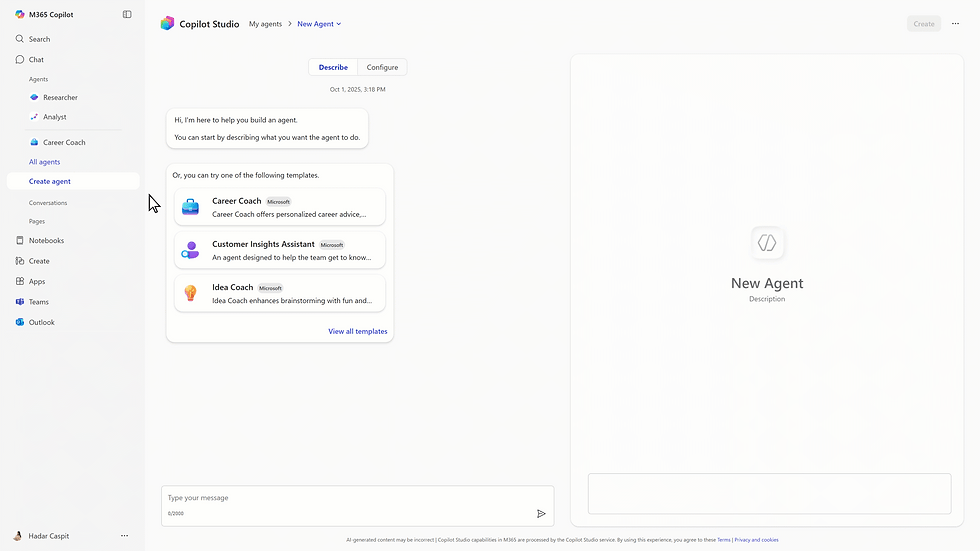
Microsoft is officially turning Copilot into more than just an AI assistant - it’s becoming a no-code automation and app-building platform right inside Microsoft 365. Currently rolling out to Copilot for Microsoft 365 Frontier users, this update introduces three new AI-powered agents designed to help anyone build apps and workflows without writing a single line of code:
App Builder - Instantly generate business apps, dashboards, or data-driven lists just by describing what you want in natural language. For example, “create a project tracker with task status and owner fields” becomes a fully functional app in seconds.

Workflows - Use plain English to automate tasks like reminders, approvals, or calendar-based triggers. It integrates deeply with Microsoft 365 data, allowing automations to act on emails, files, meetings, and Teams chats.

🤖 Copilot Studio Lite - A simplified version of Copilot Studio that allows users to build and deploy lightweight, custom copilots tailored to specific business scenarios - all within the secure Microsoft 365 environment.
Want to learn more? Check out our blog post: Here.
Copilot use of Shared Mailboxes
Microsoft 365 Copilot now supports shared and delegate mailboxes, allowing users and their delegates to read, summarise, and draft email responses directly within those mailboxes.
This update marks a big step forward for collaboration, particularly in environments where shared inboxes handle customer service, HR, or project communications. For delegated access, full mailbox permissions are required for Copilot to function correctly.
This enhancement means teams can now use AI to streamline inbox management, maintain consistent messaging, and improve responsiveness without manual effort. Simply ensure Copilot licensing is in place, confirm the right permissions, and start prompting Copilot to summarise or respond to emails within your shared or delegated mailboxes.
New default Copilot Model - GPT-5
We have previously discussed the release of GPT-5 in to the copilot ecosystem back in August (Check out the blog). Now Microsoft will be updating the default model used by Copilot to be GPT-5. GPT-5 represents OpenAI’s most advanced generation, delivering faster, more accurate, and context-aware responses, automatically choosing the best-suited variant for each prompt, using lightweight, high-speed models for quick answers and more advanced reasoning models for complex queries.
Upload Multiple Reference Images for Image Creation
Microsoft is enhancing Copilot Chat with the ability to upload multiple reference images within a single conversation. This improvement simplifies the image generation process, reduces repetitive steps, and enables more dynamic, flexible visual creation - directly responding to user feedback.
💻
Windows
Windows 10 End of Life
As October comes to a close, it’s a fitting time to reflect on the end of support for Windows 10, the operating system that rescued many from the dark days of Windows 8. By now, most users should have made the move to Windows 11, but for those with legacy dependencies or applications that still rely on Windows 10, Microsoft is offering Extended Security Updates (ESU) SKUs to keep systems protected while you complete your transition.

MS Paint gets AI Style Refresh
Microsoft Paint is receiving a fresh AI-powered feature called “Restyle” in its latest update for Windows 11 Insiders. With Restyle, users on Copilot+ PCs can open Paint, select the “Restyle” option via the Copilot menu, choose from a list of artistic styles, and then generate a transformed version of their image.

🗂️
Microsoft 365
Icon Refresh
Microsoft has unveiled refreshed icons across the 365 suite that reflect the shift into the AI era. The new look features cleaner shapes, richer colours, and a connected design system - all intended to signal the move from a collection of apps toward a unified, intelligent workspace powered by Copilot. These redesigned icons will roll out in the coming weeks across Windows, Mac, web, and mobile platforms for both personal and business users.

⚙️
Microsoft 365 Admin
User Source of Authority (SOA) to the Cloud
Organisations moving to a cloud-first identity model can now shift the “source of authority” for user accounts from on-premises Active Directory Domain Services (AD DS) into Microsoft Entra ID. That means instead of managing user objects primarily in AD and syncing them to the cloud, the user-object lifecycle can be governed in Entra ID directly - simplifying infrastructure, enabling richer governance, and reducing on-prem dependency.
This means for your Hybrid Scenarios: your users still access some on-prem resources, but the master record lives in Entra ID.
In short: if you’re looking to streamline identity management for your MSP clients, moving the user SOA to Entra ID is a strategic step - less on-prem plumbing, more cloud native management, and better alignment with modern IAM.

📱
Intune
Policy-based removal of pre-installed Microsoft Store apps
Microsoft is giving IT admins more control over the Windows experience with policy-based removal of pre-installed Microsoft Store apps. This new capability lets organisations define which built-in apps should be automatically removed during provisioning or policy deployment - helping streamline device setup, reduce bloat, and ensure a cleaner, business-ready environment from day one.
For IT admins, this is a welcome change: no more manual scripts or post-deployment cleanup. Instead, you can now use Intune or Group Policy to manage app removals at scale, aligning devices with your standard operating environment and compliance needs. It’s a small but powerful step toward more consistent, efficient endpoint management in the modern workplace.
🎯
Do any of these updates spark your curiosity?
If you’re interested in any of these exciting Microsoft updates and want to see how they can improve your organisation’s productivity, security, management, or overall efficiency, don’t hesitate to Get in touch!
Our Microsoft experts are here to guide you through these new features and help you make the most out of them. Let’s work together to ensure your business is ahead of the curve!
0800 640 4258