


No-Code Business Automation Arrives in Microsoft 365 Copilot - Build Apps & Workflows with AI 🤖
Microsoft just took another big step toward making AI an active builder, not just an assistant!
This week, new App Builder and Workflows agents are rolling out to Microsoft 365 Copilot customers in the Frontier program, giving employees across every department the ability to create apps, workflows, and even custom agents - just by describing what they need in natural language.
That means Copilot isn’t just helping you work faster anymore - it’s helping you build the tools you need to work smarter.

💡 From Ideas to Impact - Just by Talking to Copilot
With the new App Builder, Workflows, and Agent tools, you can bring your ideas to life faster than ever. Here’s how Copilot could transform something as familiar as a product launch:
Apps: "Build a launch-tracking dashboard where teams can assign tasks, monitor milestones, and visualise campaign progress."
Flows: "Automate weekly Teams updates with upcoming deadlines and approvals from Planner."
Agents: "Create a custom assistant that answers “What’s the next milestone?” or “Where do I upload creative assets?” based on SharePoint and Teams data."
Now, all of that can be built in minutes - no coding, no manual setup, no switching between apps - just natural language.
🧱 App Builder: Build Apps in Minutes
The new App Builder agent makes it easy to create interactive tools - dashboards, lists, calculators, charts, and more - all inside your Copilot experience.
Simply describe what you want, refine it through conversation, and Copilot takes care of the structure, design, and logic. Your data stays grounded in Microsoft 365 - whether that’s coming from documents, presentations, spreadsheets, and notes - and sharing your app is as simple as sending a link.
This is low-code development taken to the next level: conversational, intelligent, and connected.

⚙️ Workflows: Automate with Natural Language
The new Workflows agent transforms how everyday tasks get done.
Need to send reminders, manage calendars, or trigger approvals automatically? Just tell Copilot what you want, and it builds the flow for you - step by step, in real time.
Workflows are optimised for end users but built on the same enterprise-grade foundation as Copilot Studio’s Agent Flows, meaning your automations are reliable, governed, and secure.

🤖 Copilot Studio Lite: Create Personalised Agents
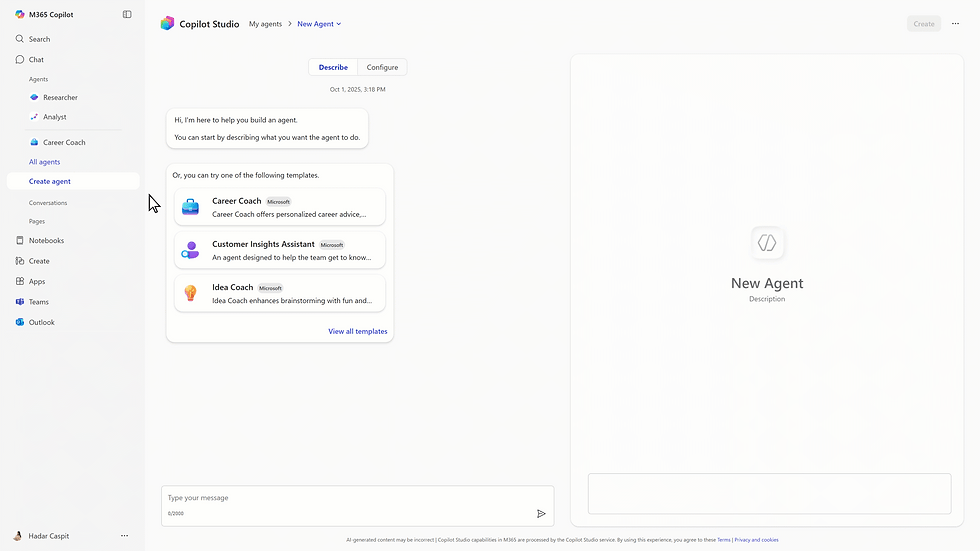
For users ready to take the next step, Copilot Studio Lite (built right into Copilot) lets you design lightweight agents tailored to your work.
Copilot Studio turns your words into logic and structured actions, making it easy to create agents that fit your workflow.
When you’re ready to scale, the full Copilot Studio unlocks advanced workflows, integrations, and collaborative multi-agent systems, bridging the gap between user-driven creation and enterprise-grade automation.
🔐 Built on Microsoft 365 Security & Governance
As always, Microsoft’s newest AI tools are built with enterprise-grade security, compliance, and governance at their core.
App Builder, Workflows, and Copilot Studio all respect user context and permissions, ensuring your apps and automations stay compliant with organisational policies.
Admins can manage everything centrally in the Microsoft 365 Admin Center, with granular access controls and visibility across all Copilot-created tools.
✨ What This Means for Your Business
Microsoft 365 Copilot is evolving from a productivity assistant into a platform for creation - empowering employees to automate, build, and innovate within the secure Microsoft 365 environment.
It’s the next logical step in the modern workplace journey: moving from using AI to building with AI.
🚀 Adopt AI, Embrace Copilot
At Mondo Cloud, we help organisations adopt and enable Microsoft 365 Copilot safely and strategically. From AI readiness assessments and security controls, to user training, Copilot Studio enablement, and workflow automation workshops - we’ll help your teams unlock the full potential of AI-powered creation.

📨 Get in touch to discuss how we can help you unlock the full potential of Copilot and achieve a seamless AI-powered transformation.
0800 640 4258