


What’s New in Microsoft - September 2025 Updates and New Features 🚀
- Mondo Cloud

- Oct 2, 2025
- 6 min read
Updated: Oct 3, 2025
Welcome to September’s edition of Mondo Clouds Microsoft Rewind - your monthly digest of what’s changing, improving, or retiring across Microsoft 365, Azure, Windows and Copilot. From Admin updates to the latest AI enhancements and Teams enhancements. This is the place to get the latest news.
🧠
Copilot Updates
Let’s kick things off with everyone’s favourite AI solution. Microsoft Copilot. It’s no surprise to see Microsoft continuing to double down on innovation, with another wave of exciting updates rolling out.
Introducing - Vibe Working!
Microsoft is introducing Vibe Working, a new evolution in Microsoft 365 Copilot that leverages Agent Mode and Office Agent to elevate everyday productivity. Unlike traditional Copilot functionality, these agents are capable of orchestrating multi-step workflows, self-validating their outputs, and autonomously generating polished deliverables - while you retain full control.
Agent Mode is rolling out initially in Excel and Word (with PowerPoint on the horizon), enabling more conversational, intelligent interactions. Meanwhile, Office Agent, embedded within Copilot Chat, can construct documents and presentations from scratch, refine them, and hand off finalised versions directly to the relevant apps. More details here!
Model Choices with Microsoft 365 Copilot
Microsoft is broadening model options within Microsoft 365 Copilot Researcher and Microsoft Copilot Studio by introducing Anthropic models alongside existing OpenAI capabilities.
Researcher can now run on either OpenAI’s deep reasoning models or Anthropic’s Claude Opus 4.1. This is available today via the Frontier Program for Microsoft 365 Copilot licensed customers who opt in.
Copilot Studio now includes Claude Opus 4.1 and Claude Sonnet 4 as additional model options, giving makers the ability to experiment with building custom agents. These models are currently in preview and not recommended for production use.
This expansion provides organisations with greater flexibility to align AI tools to their specific needs and scenarios.

In Preview: Knowledge Agent
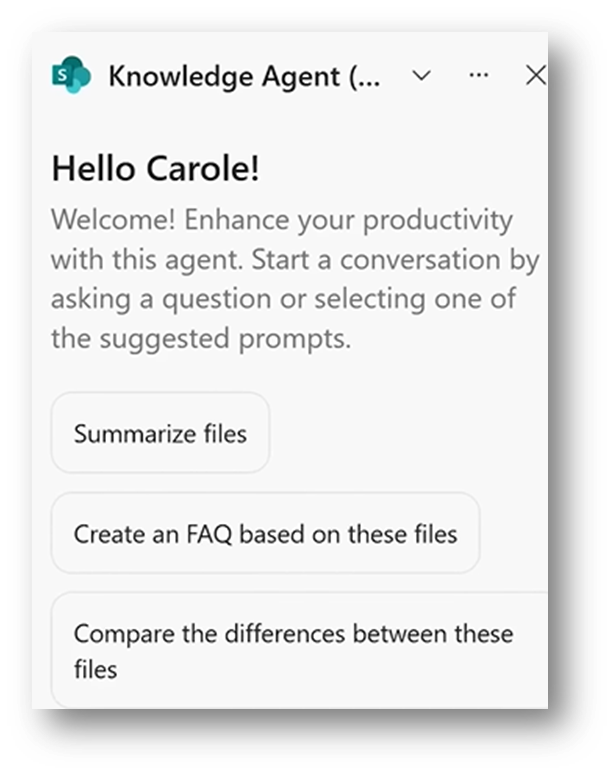
Microsoft is rolling out Knowledge Agent, a new SharePoint capability designed to help organisations optimise and prepare content for AI at scale. This feature consolidates previously fragmented AI tools into a single, context-aware interface that adapts to user roles and provides intelligent actions directly within the flow of work.
By improving content structure and context, Knowledge Agent supports more accurate and trustworthy responses from Microsoft 365 Copilot and any custom-built agents.
A new floating button will appear in the bottom-right corner of SharePoint, opening a context-sensitive menu with AI-driven actions.
AI Video Creator Update!
Microsoft is delivering a significant upgrade to the AI-powered Video Creator within Microsoft 365 Copilot. This next-generation experience makes it easier to produce professional-quality videos directly from a text prompt, PowerPoint, PDF, or Word document.
Key enhancements include:
Transcript-based editing for precise content adjustments.
Option to replace stock media with your own assets from OneDrive.
More natural-sounding voice options.
Brand Kit integration to automatically apply brand colours.
New scene structure for clearer storytelling.
A redesigned editing interface for faster, more intuitive workflows.

Upload Multiple Reference Images for Image Creation
Microsoft is enhancing Copilot Chat with the ability to upload multiple reference images within a single conversation. This improvement simplifies the image generation process, reduces repetitive steps, and enables more dynamic, flexible visual creation - directly responding to user feedback.
AI Workflows
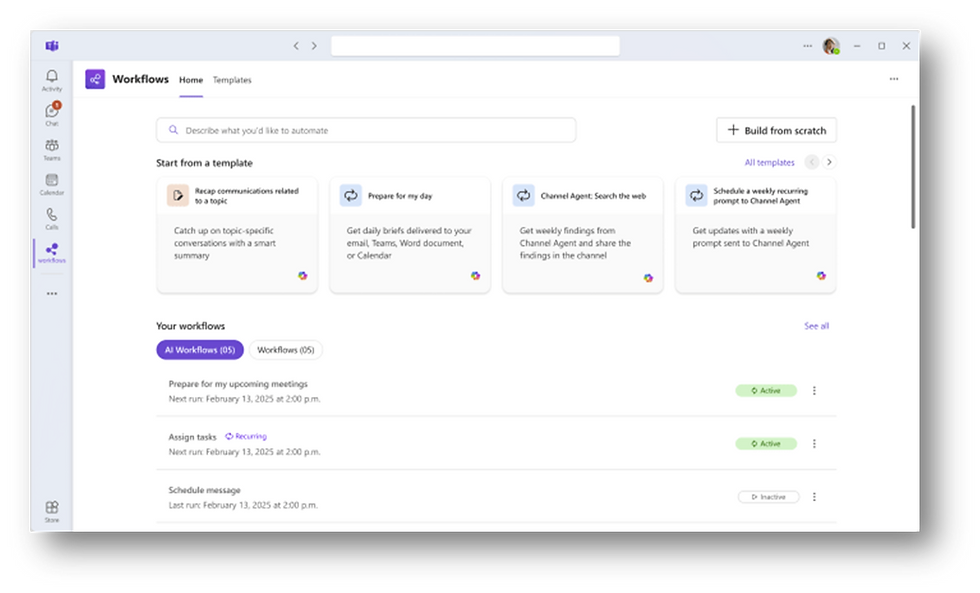
Microsoft is introducing AI Workflows within the Workflows app for Microsoft Teams. These intelligent automation templates, powered by Microsoft 365 Copilot, allow users to set up scheduled prompts and automate complex tasks with minimal effort. By leveraging predefined templates, employees can streamline daily operations, reduce manual processes, and increase productivity.
💬
Microsoft Teams
Facilitator in Microsoft Teams Meetings
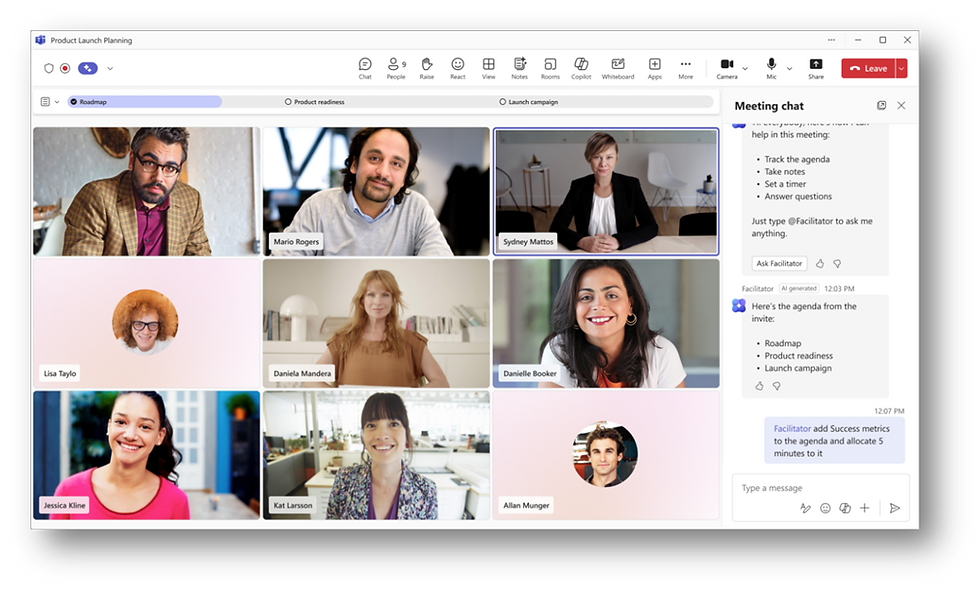
Microsoft is rolling out Facilitator, a new Teams meeting experience powered by Copilot that aims to make meetings more productive and organised.
Facilitator delivers real-time AI-generated notes, tracks key decisions and open questions, and answers open-ended queries during the meeting. It looks for an agenda (from the invite or Loop notes) and, if none is found, prompts participants to define one.
Facilitator helps keep meetings on track through built-in agenda timers, marks topics as discussion begins, and alerts when the meeting is exceeding its scheduled time. After the meeting, all generated content, including summaries, transcripts, and notes which is accessible to participants via Chat and the Recap view.
Organisers or presenters with Microsoft 365 Copilot licences can enable or disable Facilitator. While in public preview, additional capabilities like task management and document generation (e.g. Word or Loop) are available by invitation.
Teams Group Chats Get a New Notes Tab
Microsoft is introducing a Collaborative Notes tab in Teams group chats, powered by Loop (rather than OneNote, which is used in channels). This tab enables users to co-create and edit notes, meeting agendas, and action items directly within the chat interface.
It will be enabled by default, though administrators can disable it if needed. The feature is expected to roll out between late September and early October 2025.
Want to learn more about Loop? Check out our video here!
💻
Windows
Windows 25H2 is now available
Microsoft has released Windows 11, version 25H2, the latest feature update bringing new enhancements to security, performance, and productivity.
The update can be installed directly via Windows Update, and for organisations it can be seamlessly deployed and managed through Intune, Configuration Manager, or other update management tools. This ensures users stay current with the latest Windows capabilities while maintaining control over rollout across the business.
Remember with anything new and shiny be sure to test in isolation first!

⚙️
M365 Admin
Copilot App to Deploy with M365 Apps
Starting October 2025, Microsoft will begin automatically installing the Microsoft 365 Copilot app on Windows devices that already have Microsoft 365 desktop apps installed (with the exception of the EEA). The app will appear in the Start menu and will be enabled by default. Administrators retain the ability to opt out and manage deployment to suit organisational needs.
Things to consider:
Options within the Microsoft 365 Apps Admin Center to opt out if required
Notify the helpdesk and end users to reduce confusion and unnecessary support requests
Update internal documentation if it references installed apps or Copilot access points
SharePoint Site Lifecycle Management (SLM) policies Update
Microsoft has introduced greater flexibility for managing SharePoint Site Lifecycle Management (SLM) policies. Admins can now upload a CSV file to define a custom scope of up to 10,000 SharePoint site URLs for policy enforcement.
Key changes include:
Sites with existing retention policies or holds are automatically included in scope.
The inactivity period setting has been moved from the Scope page to the Configuration page in both the policy creation wizard and the details panel.
This capability is enabled by default and requires no additional setup.
This update helps organisations apply lifecycle management policies more precisely across large and complex environments.
Return of the M365 E5 with Teams SKU
In November 2025, Microsoft will once again allow the sale of Microsoft 365 E5 (and other Office/M365 suites) inclusive of Teams, restoring the option to bundle the collaboration platform directly.
This change reverses prior unbundling introduced to comply with regulatory pressures, particularly in Europe where Microsoft had separated Teams from many suite offers to provide clearer pricing choices and interoperability guarantees.
A welcome change to anyone effected by the previous changes.
New Defender & Purview Suites for Microsoft 365 Business Premium
Microsoft 365 Business Premium customers will be able to adopt two new, distinct add-ons - Defender Suite and Purview Suite - designed specifically for small and medium businesses. These are not mere rebrands of the old E5 add-ons; they’re freshly packaged licences offering enterprise-grade security and compliance capabilities, but with simpler licensing and lower overhead.
Defender Suite (≈ £8.09/user/month) delivers protection for identities, endpoints, email, and cloud apps. Features include Entra ID P2, threat detection, device-level analytics, phishing simulations, and real-time response mechanisms.
Purview Suite (≈ £8.09/user/month) gives SMBs advanced compliance controls: insider risk management, automatic information protection and DLP, encryption & customer key support, audit & eDiscovery, and records management.
For organisations needing full coverage, there’s also a combined Defender + Purview Suite (≈ £12.08/user/month), which bundles both sets of capabilities in a single licence. This option simplifies administration and often costs less than buying both separately.
Want to learn more about these new SKUs? Check out our blog post here!
🎯
Do any of these updates spark your curiosity?
If you’re interested in any of these exciting Microsoft updates and want to see how they can improve your organisation’s productivity, security, management, or overall efficiency, don’t hesitate to Get in touch!
Our Microsoft experts are here to guide you through these new features and help you make the most out of them. Let’s work together to ensure your business is ahead of the curve!
0800 640 4258